To create and implement optimal digital marketing strategies, businesses need to work seamlessly with their marketing agencies. One powerful way to achieve this is by giving your agency access to your Meta Business Suite. This access ensures that your marketing efforts are streamlined, targeted, and effective.
What is the Meta Business Suite?
The Meta Business Suite is an all-in-one tool that helps businesses manage their Facebook, Instagram, and Messenger accounts in one place. It’s designed to simplify your social media management and enhance your digital presence. Key features include:
- Content Scheduling: Plan and publish posts across multiple platforms.
- Insights and Analytics: Track performance metrics to understand what’s working and what isn’t.
- Ad Management: Create, manage, and optimise ad campaigns.
- Unified Inbox: Manage messages and comments from all your social channels in one place.
By leveraging these features, businesses can streamline their marketing efforts and significantly enhance their visibility and engagement.
Step-by-Step Guide to Granting Agency Access
Giving your agency access to your Meta Business Suite is a straightforward process, but it’s essential to do it securely. Follow these steps to ensure a smooth setup:
1. Navigate to Your Meta Business Suite
Log in to your Meta Business Suite account. If you don’t already have one, you can create it by visiting Meta Business Suite.
2. Go to Business Settings
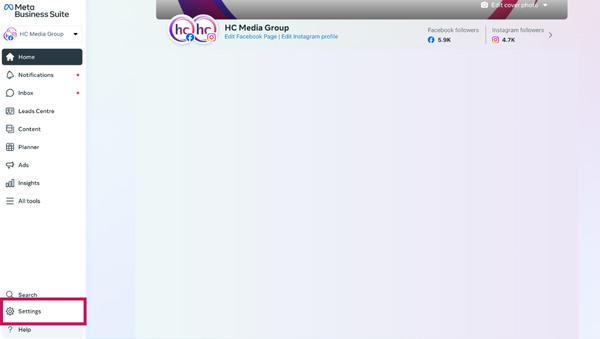
Once inside, click on the “Settings” gear icon, usually found in the lower-left corner of the dashboard.
3. Add Your Agency
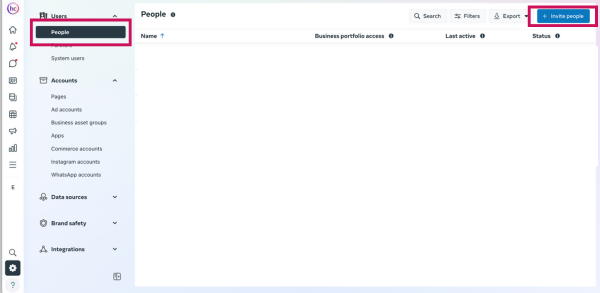
In the Business Settings menu, find the “People” section. Here, you can add new users by clicking on the “Invite People” button. Enter the email address of your agency representative.
4. Assign Roles and Permissions
It’s crucial to assign the right roles and permissions to your agency. Meta Business Suite offers various roles, such as Admin, Editor, and Analyst. Choose the appropriate role based on the tasks your agency will handle. Admin roles have full access, while Editors can create and manage content, and Analysts can view insights.
5. Confirm Access
Once you’ve completed these steps, your agency will receive an invitation to access your Meta Business Suite. They must accept the invitation to start managing your account.
Conclusion
Granting your marketing agency access to your Meta Business Suite is a game-changer for your digital marketing strategy. It allows for seamless collaboration, more efficient management of social media accounts, and better-targeted campaigns.
At HC Media Group, we specialise in helping businesses leverage tools like the Meta Business Suite to pioneer their industries. Ready to take your digital marketing to the next level? Contact us today to see how we can work together.